 graft
Repeat Six Easy Tasks on your own desk in 10 minutes.
Frontier LLMs driving raw motor APIs scored 0 / 36 on RoboCurve’s real-world Six Easy Tasks. Print our 3-datum paper mat, pick your robot arm and local or cloud AI below, and run deterministic Envelope 0.2 L0 OBSERVE pre-flight checks before your arm moves a millimeter.
Published Nov 25, 2026 on robocurve.org/blog/six-easy-tasks/. Humans & teleoperators score 100%; bare frontier LLM agents issuing open-loop motor calls jam, miss tolerances, or lose grip across all 6 tasks.
Articulated MuJoCo 4.0.1 + Rust graft-core rehearsal under ±5 mm jitter (0.78 s). Deformables (envelope lip, backpack fabric, thin ziplock) are articulated proxies here — high sim-to-real gap remains on physical thin films.
Desktop SO-ARM101 (6× STS3215 servos, 11.7–12.0 V) running live desk calibration. Physical task scores are published ONLY as recorded with uncut video + signed EV-03 receipts — never inflated from simulation.
Repeat SET on YOUR Setup
Pick the robot arm on your bench and the AI brain you want to drive it. The honesty matrix, 4-step commands, and Phone-Photo Setup Coach prompt update live below.
1. Single-Arm Fixture vs. Bimanual Honesty Matrix (All 6 SET Tasks)
| SET Task | Status on Selected Arm | Exact Desk Fixture / Bimanual Strategy | Real YAM Baseline | SET-Sim Rehearsal (±5 mm) |
|---|
2. Tailored 4-Step Repeatable Onboarding Commands
Always start in L0 OBSERVE (0 motion) and graduate to L1 Atomic Assist (30% speed, per-step human [y/N] approval) only after verifying all 3 datums.
3. Zero-Background Phone-Photo LLM Setup Coach Prompt
New to robotics? Tape the printed mat to your desk, snap 1 overhead phone photo of your arm + mat + power strip, and paste this tailored prompt into Apple MLX Mac mini.
Printable 3-Datum Table Calibration Mat (US Letter & A4)
Why do robot demos break the second you move to a different desk? Hardcoded joint angles. Print this 1-page SVG at 100% / Actual Size, verify the 100 mm ruler bar, and touch 3 crosshairs (A, B, C) so Graft solves your exact desk SE(3) transform automatically.
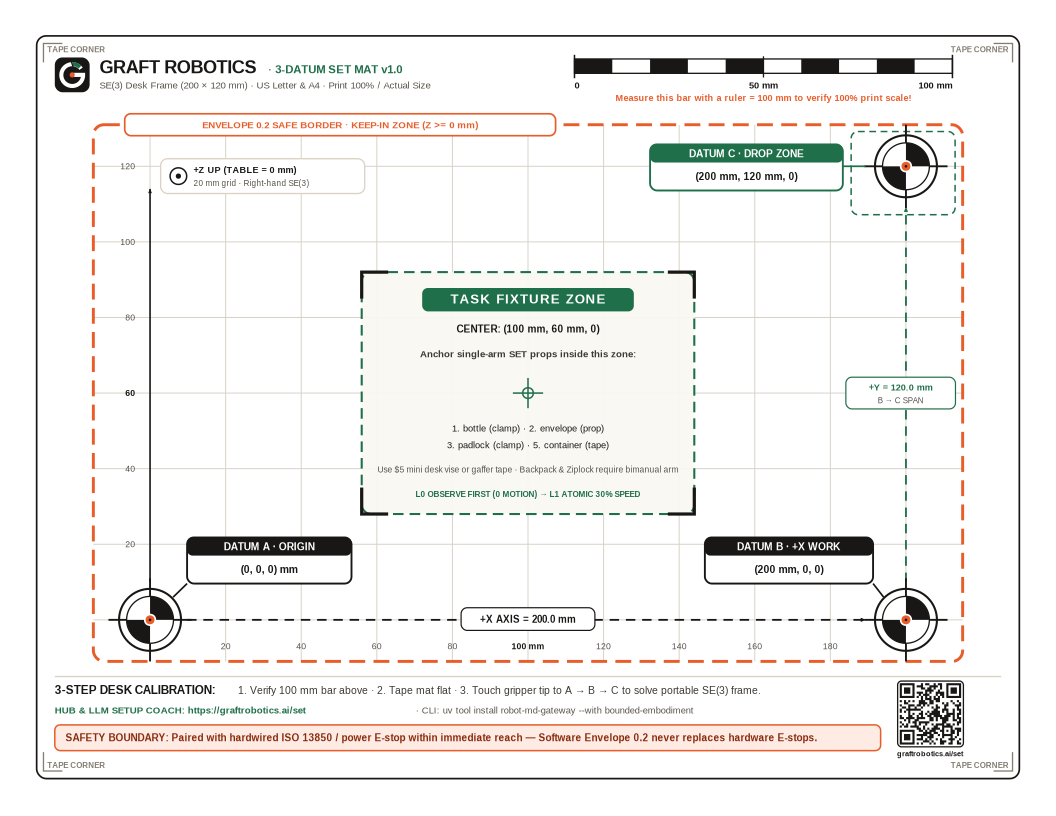
3 Exact Targets · 20 mm Grid · 100 mm Ruler Check
- DATUM A · ORIGIN (0, 0, 0) — Bottom-left crosshair defines your table origin and
Z = 0 mmdesk plane. - DATUM B · +X WORK (200 mm, 0, 0) — Locks the exact
+Xdesk axis and catches print scaling or kinematic drift. - DATUM C · DROP ZONE (200 mm, 120 mm, 0) — Locks the orthogonal
+Yplane and marks the safe drop zone. - TASK FIXTURE ZONE · Center (100 mm, 60 mm, 0) — Mount your $5 mini desk clamp or gaffer tape here so every task stays inside the dashed Envelope 0.2 Safe Border.
100 mm verification bar before taping down all 4 corners.
MuJoCo 4.0.1 SET-Sim Contact Rehearsal (36 / 36 vs. 9 / 36 Open-Loop)
Before touching real servos, Graft rehearses all 6 SET tasks under ±5 mm perception jitter with Rust graft-core bounds + compliant 6-DoF wrist F/T spiral search and sensor postcondition retries.
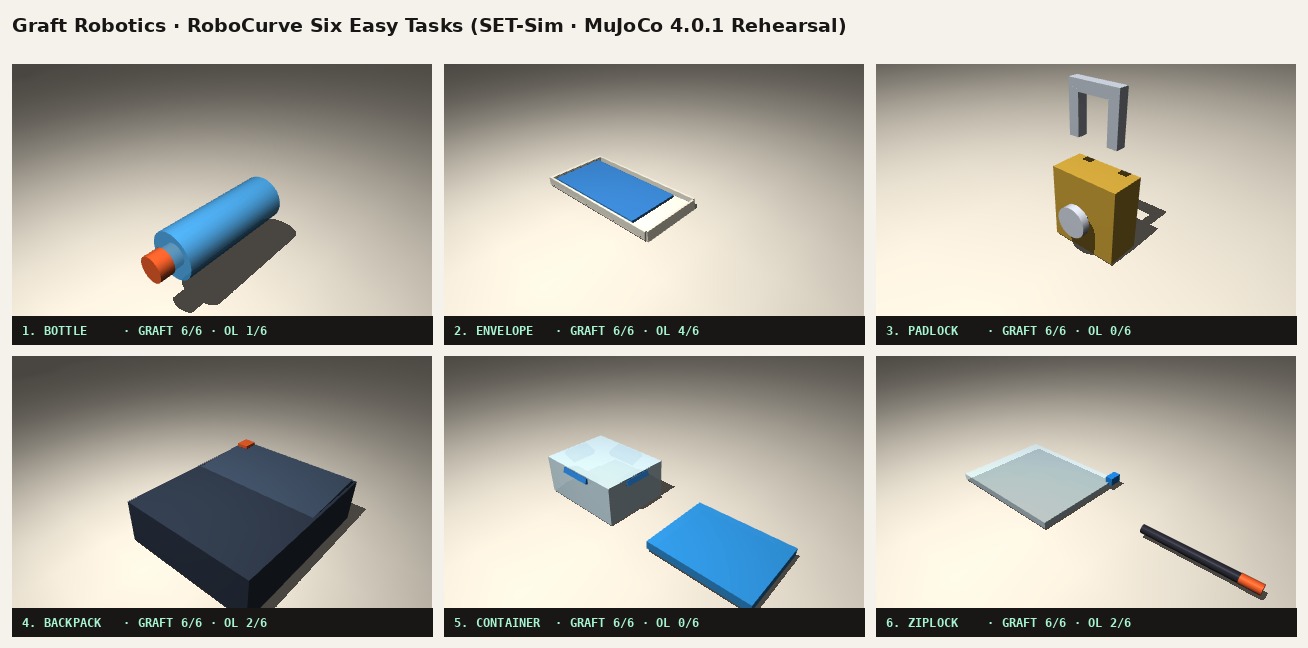
Why Closed-Loop Primitives Beat Raw LLM Motor Scripts
Under ±5 mm jitter, open-loop scripts cross-thread bottle caps (1/6), miss 1.2 mm padlock keyways (0/6), and leave container latches stuck (0/6). Graft’s closed-loop harness recovers in 0.33–1.33 retries with 0 Envelope 0.2 excursions in 0.78 s.
Honest Transfer Caveat: Rigid-contact tasks (bottle, padlock, container) map cleanly when paired with wrist F/T or clamped fixtures; deformable tasks (envelope lip, backpack cloth, clear ziplock) remain articulated proxies in sim and require live physical hardware validation.
robot-gate, graft-core, graft-watchdog, bounded-embodiment, robot-md-gateway) provides a deterministic, default-deny software pre-flight boundary and signed EV-03 audit trail — NEVER a replacement for a certified ISO 13850 hardwired emergency stop, ISO 13849-1 safety relay, or physical power-strip kill switch within immediate reach. Keep hands clear of pinch points during any live motion, start every desk session in L0 OBSERVE, and keep a hardware power cut within one hand’s reach.